- Important messages sink because everything looks equal, newest wins and people mute busy groups.
- Try pinned rules, a separate admin-only notices group and a weekly summary in your current group first.
- The real fix is sorting messages by purpose into announcements, topic groups, timings and a help desk.
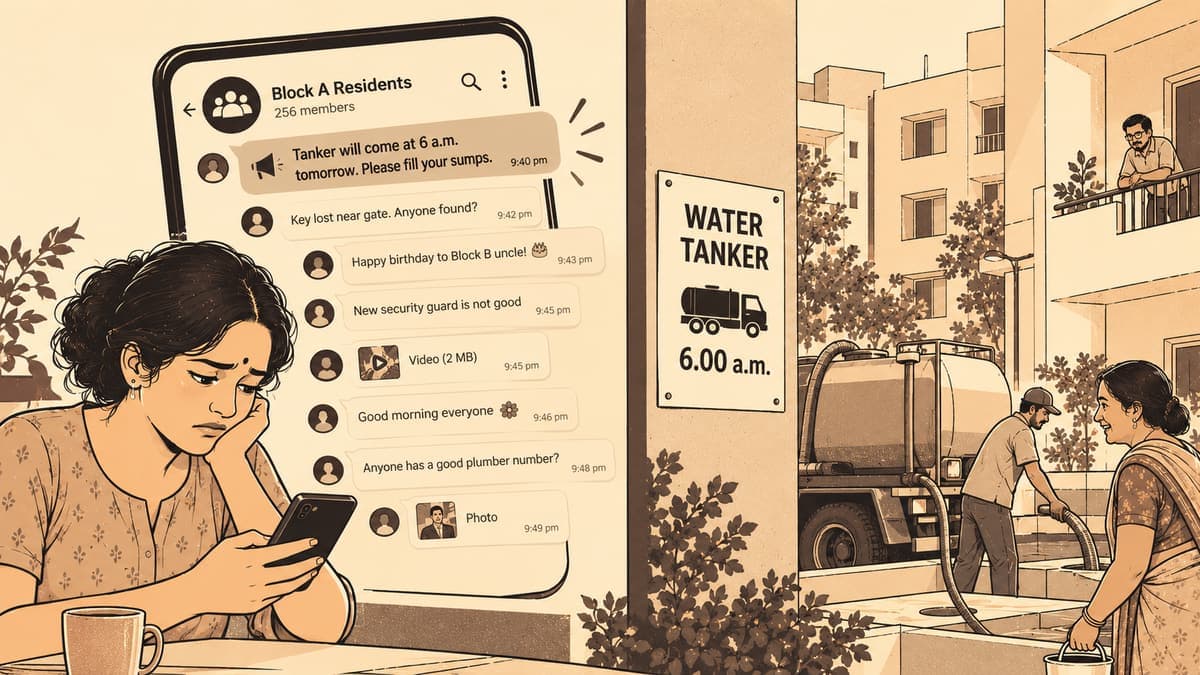
It is 9.40 at night. The association secretary in your Tambaram apartment posts that the water tanker will come at 6 a.m. tomorrow instead of the usual 10, so please fill your sumps tonight. Within the hour, there are forty new messages: a lost key, birthday wishes for the Block B uncle, a debate about the new security guard, and two videos nobody asked for. By morning, half the building has not seen the tanker notice. The other half is annoyed that nobody "told them".
If this sounds familiar, you are not alone, and it is not anyone's fault. An apartment WhatsApp group is doing ten jobs at once, and the most important messages are usually the quietest ones.
This guide is practical. First, the fixes you can try in your existing group tonight. Then, what to do if those are not enough.
Why the important messages sink
It helps to name what is actually happening.
- Everything is equal. A power-cut notice and a "good morning" forward look identical in the chat. Nothing marks one as more urgent.
- Newest wins. In any chat, the latest message pushes everything else up. A notice posted at night is gone by breakfast.
- People mute. Busy groups get muted, especially by working residents commuting on OMR or the GST Road. Muted groups mean missed notices.
- Replies pile on. One notice gets fifteen "noted, thanks" replies, which bury the notice under itself.
- No memory. A new tenant who joins next month cannot see the lift maintenance schedule shared in March.
Fixes you can try in your current group
Before changing tools, try these. Some neighbourhoods find they are enough.
- Write simple group rules and pin them. For example: no forwards, no greetings, notices only from committee members in the morning. WhatsApp lets admins pin messages, so use it.
- Create a separate notices group. Many apartments run an admin-only "announcements" group alongside the chatty one. Only the committee can post there, so nothing gets buried.
- Ask people to react instead of replying. A thumbs-up says "seen" without adding a new message.
- Post a weekly summary. Every Sunday, one volunteer posts the week's key dates: tanker timings, the pest control visit, the general body meeting.
- Keep a shared document of key numbers. Electrician, plumber, lift AMC, the nearest EB office. Pin the link.
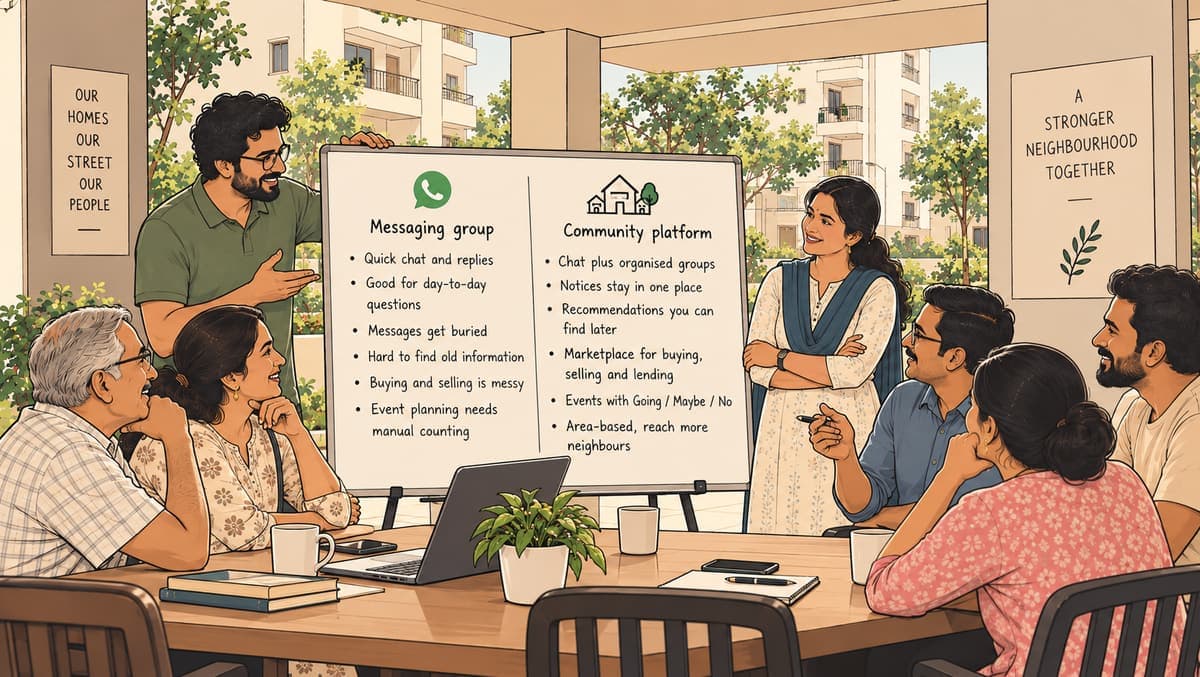
These help. But you will notice that most of them are workarounds: you are building structure on top of a tool that was designed for conversation.
Sort messages by what they are for
The real fix is to stop putting everything in one stream. Here is how a typical week of apartment messages might be sorted instead.
| Message | Where it should live |
|---|---|
| "Tanker at 6 a.m. tomorrow" | An admin-only announcements space, plus a standing timings list |
| "Pest control on Saturday, keep kitchens clear" | Announcements, with a reminder |
| "Anyone know a good AC mechanic?" | A question that keeps its answers together |
| "Selling a study table, ₹1,500" | A buy-and-sell space |
| "Who's coming for the Karthigai Deepam lighting?" | An event with a headcount |
| "Car parked in my slot again" | A Parking group, so it does not flood everyone |
| "Happy Deepavali, all!" | The general chat, where it belongs |
Once you see it like this, it is clear that the problem is not the people. It is that one chat is trying to be a notice board, a classifieds page, a helpline and a party invitation, all at once.
Where Zinola fits
Zinola is a free Chennai neighbourhood app that gives your apartment a circle with these spaces already built in.
- Announcements: an optional admin-only group. Committee notices stay clean and easy to find.
- Topic groups: up to 20 of your choice, like Maintenance, Parking, Pets or Lost & found. Each group can be open, private or admin-only posting. Residents join what matters to them, and the General chat stays lighter.
- Alerts & timings: a standing place for power and water cuts, tanker, garbage and milk timings. A new tenant can see it on day one.
- Important numbers and FAQ: the lift AMC, the security desk, "where do I park my second vehicle?" Answered once, kept for good.
- Pin, save and mute: in any chat you can pin a message, save one to your own Saved messages, and mute a chat that gets too busy for you.
- Help desk and Book a space: in Apartment circles, residents can raise issues and book the clubhouse or party hall instead of asking in the chat.
- Automatic rooms: "Buy & sell" and "Polls & events" pull sales and plans out of the main chat.
If you are setting up a circle for your building, our guide on starting an apartment circle walks through it, and the circles page shows how it looks.
A two-week plan for your committee
Changing habits in a building takes a little patience. This plan keeps it gentle.
Week one
- Create the circle and turn on Announcements.
- Add three or four groups residents actually need, nothing more.
- Fill in Alerts & timings and Important numbers before inviting anyone.
- Share the invite link in your WhatsApp group and put the QR code on the lift notice board.
Week two
- Post every committee notice in Announcements first, then share it to WhatsApp with a short line.
- When someone asks for a helper in WhatsApp, reply with a link to Trusted helpers.
- Run one poll, say on the Diwali decoration budget, with a closing date.
By the end of the fortnight, residents start opening the circle when they want to know something, and the WhatsApp group goes back to being friendly chatter.
For a broader comparison, see WhatsApp groups vs community platforms. And for ways to get more residents involved, read how to encourage participation in your residential community.
Questions people ask
- How do I stop important notices getting buried in our apartment group?
- Keep notices in a separate space where only the committee can post, and keep standing information like tanker timings and key numbers in a list rather than a message. In a Zinola circle, that is the admin-only Announcements group, Alerts & timings and Important numbers.
- Can only admins post in some groups on Zinola?
- Yes. Announcements is admin-only, and any of the up to 20 groups in a circle can be set to admin-only posting, open, or private where people ask to join.
- Can new residents see old notices and numbers?
- Standing information kept in board tools like Alerts & timings, Important numbers and the FAQ is there for every member, including someone who joined yesterday.
- Can residents book the clubhouse through the circle?
- Apartment circles include Book a space and a Help desk, so residents can book a shared space or raise an issue without asking in the chat.
Give your notices a quiet home
Set up an apartment circle with Announcements, Alerts & timings and Important numbers, then invite residents with a link or QR code.
Set up a circle